Friday, December 2, 2011

How to JDeveloper memory settings


Before, Did you get warning message the "Low memory warning" on JDeveloper .
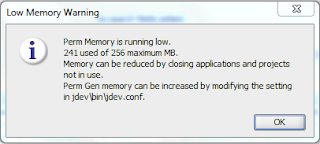

I will describe how to fix it. There are two config files on jdeveloper installation directory.
the first one is jdev.conf file. the file located in \jdeveloper\jdev\bin
increase the memory values for the following parameters:
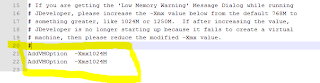
AddVMOption -XX:MaxPermSize=1024M

the second one is ide.conf file on \jdeveloper\ide\bin.

AddVMOption -Xmx1024M
AddVMOption -Xms1024M
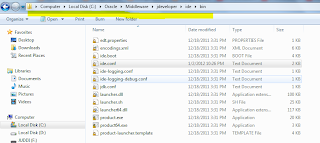


For now start JDeveloper. if jdeveloper can not start, decrease memory allocated values and retry to start jdeveloper
Thursday, December 1, 2011

How to change jdeveloper domain creation location


when you run any adf web application using integrated weblogic server, domain not create oracle product home directory and
The domain located to default location. for example

C:\Users\Administrator\AppData\Roaming\JDeveloper\system11.1.1.4.37.59.23 like this.

to change values of two variables :JDEV_USER_HOME,JDEV_USER_DIR

1. to to oracle product installed directory
2. \jdeveloper\jdev\bin
3. open jdev.boot file.
4. check below line as picture.

to set environment variables set:
this will create two variable in system variable.
It shows follow pictures.


for now. Restart jdeveloper and run adf application and will create new integreted domain to pointed your location.
Wednesday, November 30, 2011

ADF Query Component Usage with ADF Panel Stretch Layout


There is a very nice layout component in ADF 11g - af:panelStretchLayout (ADF Panel Stretch Layout). This component comes with 5 facets - Bottom, Center, End, Start and Top. It allows to split your page layout in more easy way - you can put menu component into Top facet, functional logic into Center facet.

Everything seems okej and clear, however there is hidden issue when you need to have menu elements in Top facet dependent on ADF Query from Center facet. For example, menu item can be enabled/disabled based on ADF Query results:


click here detail read post


project workspace download :PanelStretchLayoutADFQuery.zip

JDeveloper 11g and ADF Task Flow Parameters


Developed sample application - TaskFlowParamaters.zip is based on standard HR schema, Departments and Employees entities. Unbounded task flow contains selectDepartments page and call to separate bounded task flow. Bounded task flow contains employees page and Task Flow Return component, this component allow to return to calling ADF Task Flow.


When I was creating this application, I have used Fusion Web Application (ADF) as a template for developed sample application. Empty unbounded task flow was created automatically - adfc-config.xml. My next step was to create bounded task flow - task-flow-definition.xml:
click here detail read post


project workspace download :TaskFlowParamaters.zip

Create, Edit and Delete operations in ADF Faces af:table component


Developed sample application EditableTable11.zip, provides read-only table with those actions - Delete, Create, Edit, Save, Cancel. Row selected for editing is shown in editable mode and can be updated. Application is based on HR schema that comes with Oracle XE database. Application logic is based on Jobs entity from HR schema.
This sample is developed using the same principle as described in my previous post. I will describe what are the differences in implementation:
click here detail read post


project workspace download :EditableTable11.zip
Monday, November 28, 2011

Install Oracle JDevevoper


In this post, I will explain how to install oracle jdeveloper tools on windows and linux os. which is almost same way.
1. first of all you must download jdeveloper installer from here.
2. click the exe installer file


3. click next.

4. choose oracle middleware home. if you have already oracle home which is show on and didn't have select create new middleware home.

5. click next

6. Installation process will install the following software products
JDeveloper and ADF
Weblogic Server


7. choose JDK


If you had already installed jdk, you can set the jdk location. if not new jdk will install on your oracle home.
8. click next

9. click next.


here you can insert Node manager port. Default value is 5556. if select YES nodemanager automatically runs when start OS

10. starting install
11. Installation Summary

that's finish
Sunday, November 27, 2011

ADF application deployment to custom weblogic domain


few days ago, I had problems for adf web application deployment to weblogic custom domain.
today is, I will post about the web deploy to custom domain.

There are some some useful posts:
http://blogs.oracle.com/shay/entry/common_pitfalls_when_deploying
http://radalcove.com/blog/?p=34
http://www.oracle.com/webfolder/technetwork/jdeveloper/howto/11114/managedserver/wlsadfms.html
http://chrismuir.sys-con.com/node/952411/mobile
http://technology.amis.nl/blog/6167/deploying-and-running-adf-11g-applications-on-weblogic-11g


If below error occurs while deploying the error fixed by follow steps

1. Caused by: java.lang.ClassNotFoundException: oracle.adf.model.servlet.ADFBindingFilter
See server logs or server console for more details.

----check ADF Web Runtime

2. Caused by: java.lang.ClassNotFoundException: oracle.bc4j.mbean.BC4JConfigLifeCycleCallBack
See server logs or server console for more details.

----check BC4J Runtime

3. Caused by: java.lang.ClassNotFoundException: oracle.jsp.runtimev2.JspServlet
See server logs or server console for more details.

----
ojsp.jar: copy ojsp.jar file to domain lib directory and restart domain


4.Caused by: java.lang.ClassNotFoundException: oracle.adf.library.webapp.ResourceServlet
See server logs or server console for more details.

----ADF Common Web Runtime


go to Project properties->deployments->Edit->WEB-INF/lib->contributors on left tab panel then check libraries.

okey ,now deployment success finished. The application worked normal. but showed up warning message on admin consle and UI.


I added to the groovy-all jar file to the CLASSPATH in setDomainEnv.sh.